Chapter 10: Testing
In earlier chapters, we checked each new feature by opening the application in a browser. We also need to make sure existing features keep working. In a large application, manually checking everything after each change quickly becomes a lot of work. Manual testing is also unreliable, and repeating the same steps is tedious.
These are good reasons to write automated tests.
Important This book introduces testing here to keep the explanation together. In a real project, write tests as you develop each feature, and make sure they pass before moving on.
Unit tests
Unit tests check individual parts of a program, such as functions. They are a central form of automated testing. We will use Python's standard-library unittest framework. To introduce the basics, put this greeting function in hello.py:
def sayhello(to=None):
    if to:
        return f'Hello, {to}!'
    return 'Hello!'
Here are its unit tests:
import unittest

from hello import sayhello


class SayHelloTestCase(unittest.TestCase):  # Test case

    def setUp(self):  # Test fixture
        pass

    def tearDown(self):  # Test fixture
        pass

    def test_sayhello(self):  # First test
        rv = sayhello()
        self.assertEqual(rv, 'Hello!')

    def test_sayhello_to_somebody(self):  # Second test
        rv = sayhello(to='Grey')
        self.assertEqual(rv, 'Hello, Grey!')


if __name__ == '__main__':
    unittest.main()
A test case inherits from unittest.TestCase. Methods whose names begin with test_ are treated as tests.
The two empty methods are special: they are test fixtures. setUp() runs before each test method, and tearDown() runs afterward. Notice the capitalization of their names.
If running a test were cooking, setUp() would prepare the ingredients and plan the meal, while tearDown() would clean the kitchen.
Each test_ method checks a function, feature, or scenario. Here, test_sayhello() checks the call without an argument, and test_sayhello_to_somebody() checks it with an argument.
Inside a test, assertion methods check that the code behaves as expected. In the first test, we store the return value in rv, then call self.assertEqual(rv, 'Hello!') to compare it with the expected result. A failed assertion means the test fails.
Common assertion methods include:
- assertEqual(a, b)
- assertNotEqual(a, b)
- assertTrue(x)
- assertFalse(x)
- assertIs(a, b)
- assertIsNot(a, b)
- assertIsNone(x)
- assertIsNotNone(x)
- assertIn(a, b)
- assertNotIn(a, b)
Their names describe what they check. They come from unittest.TestCase, and you call them as self.<assert-method>. See the TestCase API documentation (Chinese) for the full list.
Save the tests as test_sayhello.py, then run python test_sayhello.py. The output reports the results, whether the tests passed, and the time taken.
Test the Flask application
Back in Watchlist, create test_watchlist.py in the project root. Start with fixtures and two basic tests:
test_watchlist.py: test fixtures
import unittest

from watchlist import create_app
from watchlist.extensions import db
from watchlist.models import Movie, User


class WatchlistTestCase(unittest.TestCase):

    def setUp(self):
        # Create the application with the testing configuration
        self.app = create_app(config_name='testing')
        # Create an application context
        self.context = self.app.app_context()
        # Push the context
        self.context.push()

        # Create the database tables
        db.create_all()
        # Create test data: one user and one movie
        user = User(name='Test', username='test')
        user.set_password('123')
        movie = Movie(title='Test Movie Title', year='2019')
        # Pass a list to add_all() to add several model instances
        db.session.add_all([user, movie])
        db.session.commit()

        self.client = self.app.test_client()  # Create a test client
        self.runner = self.app.test_cli_runner()  # Create a test CLI runner

    def tearDown(self):
        db.session.remove()  # Remove the database session
        db.drop_all()  # Drop the database tables
        self.context.pop()  # Pop the context

    # Test that the application exists
    def test_app_exist(self):
        self.assertIsNotNone(self.app)

    # Test that testing mode is enabled
    def test_app_is_testing(self):
        self.assertTrue(self.app.config['TESTING'])
Development and testing often need different configuration. In setUp(), we pass the testing configuration's name to the factory. Here is that configuration class:
class TestingConfig(BaseConfig):
    TESTING = True
    SQLALCHEMY_DATABASE_URI = 'sqlite:///:memory:'
TESTING = True enables testing behavior, including allowing errors to propagate to the test runner. The URI 'sqlite:///:memory:' uses an in-memory SQLite database, so tests do not affect the development database file. A separate SQLite file would also work, but an in-memory database is faster.
Some operations need a Flask context, such as url_for() or creating tables with db.create_all(). Create and push an application context in setUp():
self.context = self.app.app_context()
self.context.push()
Then call db.create_all() and insert the test data. The last two attributes created in setUp() hold a test client and a test CLI runner. They simulate browser requests and invoke custom commands, respectively; we will use them next.
In tearDown(), remove the database session with db.session.remove(), drop the tables with db.drop_all(), and pop the context. Tests manage the application lifecycle differently from a running server, so explicitly removing the session ensures it is cleaned up.
Test application features
app.test_client() creates a client that simulates a browser. We store it as self.client. Calling get() sends a GET request, post() sends a POST request, and so on. These tests make GET requests to the 404 page and home page:
test_watchlist.py: page tests
class WatchlistTestCase(unittest.TestCase):
    # ...
    # Test the 404 page
    def test_404_page(self):
        response = self.client.get('/nothing')  # Pass the target URL
        data = response.get_data(as_text=True)
        self.assertIn('Page Not Found - 404', data)
        self.assertIn('Go Back', data)
        self.assertEqual(response.status_code, 404)  # Check the response status

    # Test the home page
    def test_index_page(self):
        response = self.client.get('/')
        data = response.get_data(as_text=True)
        self.assertIn('Test\'s Watchlist', data)
        self.assertIn('Test Movie Title', data)
        self.assertEqual(response.status_code, 200)
Each request returns a response object. Call get_data(as_text=True) to read its body as Unicode text. Check for expected content to verify the page: “Go Back” on the 404 page, for example, or “Test's Watchlist” on the home page.
Next, test features that change database records: creating, updating, and deleting movies. These require authentication, so first add a login helper:
test_watchlist.py: a test helper
class WatchlistTestCase(unittest.TestCase):
    # ...
    # Helper to log in a user
    def login(self):
        self.client.post('/login', data=dict(
            username='test',
            password='123'
        ), follow_redirects=True)
login() sends a POST request to the login URL. The data dictionary supplies form values, using the inputs' name attributes as keys. Setting follow_redirects=True follows redirects and returns the final response.
Here are tests for creating, updating, and deleting entries:
test_watchlist.py: test creating, updating, and deleting entries
class WatchlistTestCase(unittest.TestCase):
    # ...
    # Test creating an entry
    def test_create_item(self):
        self.login()

        # Test creating an entry
        response = self.client.post('/', data=dict(
            title='New Movie',
            year='2019'
        ), follow_redirects=True)
        data = response.get_data(as_text=True)
        self.assertIn('Item created.', data)
        self.assertIn('New Movie', data)

        # Try creating an entry with an empty title
        response = self.client.post('/', data=dict(
            title='',
            year='2019'
        ), follow_redirects=True)
        data = response.get_data(as_text=True)
        self.assertNotIn('Item created.', data)
        self.assertIn('Invalid input.', data)

        # Try creating an entry with an empty year
        response = self.client.post('/', data=dict(
            title='New Movie',
            year=''
        ), follow_redirects=True)
        data = response.get_data(as_text=True)
        self.assertNotIn('Item created.', data)
        self.assertIn('Invalid input.', data)

    # Test updating an entry
    def test_update_item(self):
        self.login()

        # Test the edit page
        response = self.client.get('/movie/edit/1')
        data = response.get_data(as_text=True)
        self.assertIn('Edit item', data)
        self.assertIn('Test Movie Title', data)
        self.assertIn('2019', data)

        # Test updating an entry
        response = self.client.post('/movie/edit/1', data=dict(
            title='New Movie Edited',
            year='2019'
        ), follow_redirects=True)
        data = response.get_data(as_text=True)
        self.assertIn('Item updated.', data)
        self.assertIn('New Movie Edited', data)

        # Try updating with an empty title
        response = self.client.post('/movie/edit/1', data=dict(
            title='',
            year='2019'
        ), follow_redirects=True)
        data = response.get_data(as_text=True)
        self.assertNotIn('Item updated.', data)
        self.assertIn('Invalid input.', data)

        # Try updating with an empty year
        response = self.client.post('/movie/edit/1', data=dict(
            title='New Movie Edited Again',
            year=''
        ), follow_redirects=True)
        data = response.get_data(as_text=True)
        self.assertNotIn('Item updated.', data)
        self.assertNotIn('New Movie Edited Again', data)
        self.assertIn('Invalid input.', data)

    # Test deleting an entry
    def test_delete_item(self):
        self.login()

        response = self.client.post('/movie/delete/1', follow_redirects=True)
        data = response.get_data(as_text=True)
        self.assertIn('Item deleted.', data)
        self.assertNotIn('Test Movie Title', data)
Most assertions check that the response body contains the right messages and movie information.
Now test logging in, logging out, authentication protection, and settings:
test_watchlist.py: authentication tests
class WatchlistTestCase(unittest.TestCase):
    # ...
    # Test authentication protection
    def test_login_protect(self):
        response = self.client.get('/')
        data = response.get_data(as_text=True)
        self.assertNotIn('Logout', data)
        self.assertNotIn('Settings', data)
        self.assertNotIn('<form method="post">', data)
        self.assertNotIn('Delete', data)
        self.assertNotIn('Edit', data)

    # Test logging in
    def test_login(self):
        response = self.client.post('/login', data=dict(
            username='test',
            password='123'
        ), follow_redirects=True)
        data = response.get_data(as_text=True)
        self.assertIn('Login success.', data)
        self.assertIn('Logout', data)
        self.assertIn('Settings', data)
        self.assertIn('Delete', data)
        self.assertIn('Edit', data)
        self.assertIn('<form method="post">', data)

        # Try logging in with the wrong password
        response = self.client.post('/login', data=dict(
            username='test',
            password='456'
        ), follow_redirects=True)
        data = response.get_data(as_text=True)
        self.assertNotIn('Login success.', data)
        self.assertIn('Invalid username or password.', data)

        # Try logging in with the wrong username
        response = self.client.post('/login', data=dict(
            username='wrong',
            password='123'
        ), follow_redirects=True)
        data = response.get_data(as_text=True)
        self.assertNotIn('Login success.', data)
        self.assertIn('Invalid username or password.', data)

        # Try logging in with an empty username
        response = self.client.post('/login', data=dict(
            username='',
            password='123'
        ), follow_redirects=True)
        data = response.get_data(as_text=True)
        self.assertNotIn('Login success.', data)
        self.assertIn('Invalid input.', data)

        # Try logging in with an empty password
        response = self.client.post('/login', data=dict(
            username='test',
            password=''
        ), follow_redirects=True)
        data = response.get_data(as_text=True)
        self.assertNotIn('Login success.', data)
        self.assertIn('Invalid input.', data)

    # Test logging out
    def test_logout(self):
        self.login()

        response = self.client.get('/logout', follow_redirects=True)
        data = response.get_data(as_text=True)
        self.assertIn('Goodbye.', data)
        self.assertNotIn('Logout', data)
        self.assertNotIn('Settings', data)
        self.assertNotIn('Delete', data)
        self.assertNotIn('Edit', data)
        self.assertNotIn('<form method="post">', data)

    # Test settings
    def test_settings(self):
        self.login()

        # Test the settings page
        response = self.client.get('/settings')
        data = response.get_data(as_text=True)
        self.assertIn('Settings', data)
        self.assertIn('Your Name', data)

        # Test updating settings
        response = self.client.post('/settings', data=dict(
            name='Grey Li',
        ), follow_redirects=True)
        data = response.get_data(as_text=True)
        self.assertIn('Settings updated.', data)
        self.assertIn('Grey Li', data)

        # Try updating settings with an empty name
        response = self.client.post('/settings', data=dict(
            name='',
        ), follow_redirects=True)
        data = response.get_data(as_text=True)
        self.assertNotIn('Settings updated.', data)
        self.assertIn('Invalid input.', data)
Test custom commands
Views are not the only code to test. app.test_cli_runner() creates a runner for custom commands; we store it as self.runner. Call invoke() with a command object, or pass the command and arguments as a list through args. The returned result's output attribute contains the command's output. Here are tests for our commands:
test_watchlist.py: test custom CLI commands
# Imports for command tests
from watchlist.extensions import db
from watchlist.models import Movie, User


class WatchlistTestCase(unittest.TestCase):
    # ...
    # Test sample data generation
    def test_forge_command(self):
        result = self.runner.invoke(args=['forge'])
        self.assertIn('Done.', result.output)
        self.assertNotEqual(Movie.query.count(), 0)

    # Test database initialization
    def test_initdb_command(self):
        result = self.runner.invoke(args=['init-db'])
        self.assertIn('Initialized database.', result.output)

    # Test creating an administrator
    def test_admin_command(self):
        db.drop_all()
        db.create_all()
        result = self.runner.invoke(args=['admin', '--username', 'grey', '--password', '123'])
        self.assertIn('Creating user...', result.output)
        self.assertIn('Done.', result.output)
        self.assertEqual(User.query.count(), 1)
        self.assertEqual(User.query.first().username, 'grey')
        self.assertTrue(User.query.first().validate_password('123'))

    # Test updating the administrator
    def test_admin_command_update(self):
        # Pass the complete command argument list through args
        result = self.runner.invoke(args=['admin', '--username', 'peter', '--password', '456'])
        self.assertIn('Updating user...', result.output)
        self.assertIn('Done.', result.output)
        self.assertEqual(User.query.count(), 1)
        self.assertEqual(User.query.first().username, 'peter')
        self.assertTrue(User.query.first().validate_password('456'))
These assertions check that commands change the database correctly and print the expected messages through result.output.
Run the tests
Add this at the end of the test script:
if __name__ == '__main__':
    unittest.main()
Run the tests with:
(.venv) $ python test_watchlist.py
...............
----------------------------------------------------------------------
Ran 15 tests in 2.942s

OK
If a test fails, the detailed error output helps you locate the problem and fix either the application code or the test.
Test coverage
You can make the application more reliable by adding more thorough tests. But how do you know which code has been tested and which has not? Coverage.py measures test coverage. Install it:
(.venv) $ pip install coverage
Run the tests under coverage, using --source to select the module or package to measure:
(.venv) $ coverage run --source=watchlist test_watchlist.py
Tip Put the source setting in a configuration file to avoid specifying it each time. See the configuration documentation.
Display the report:
$ coverage report
Name                               Stmts   Miss  Cover
------------------------------------------------------
watchlist/__init__.py                 23      0   100%
watchlist/blueprints/__init__.py       0      0   100%
watchlist/blueprints/auth.py          28      0   100%
watchlist/blueprints/main.py          61      1    98%
watchlist/commands.py                 41      1    98%
watchlist/errors.py                   11      2    82%
watchlist/extensions.py               13      3    77%
watchlist/models.py                   20      0   100%
watchlist/settings.py                 15      0   100%
------------------------------------------------------
TOTAL                                212      7    97%
For each file, the report lists the number of statements (Stmts), statements not executed (Miss), and coverage percentage (Cover).
For a detailed HTML report, run coverage html. It creates an htmlcov directory. Open index.html inside it and click a filename to inspect its covered and uncovered code:
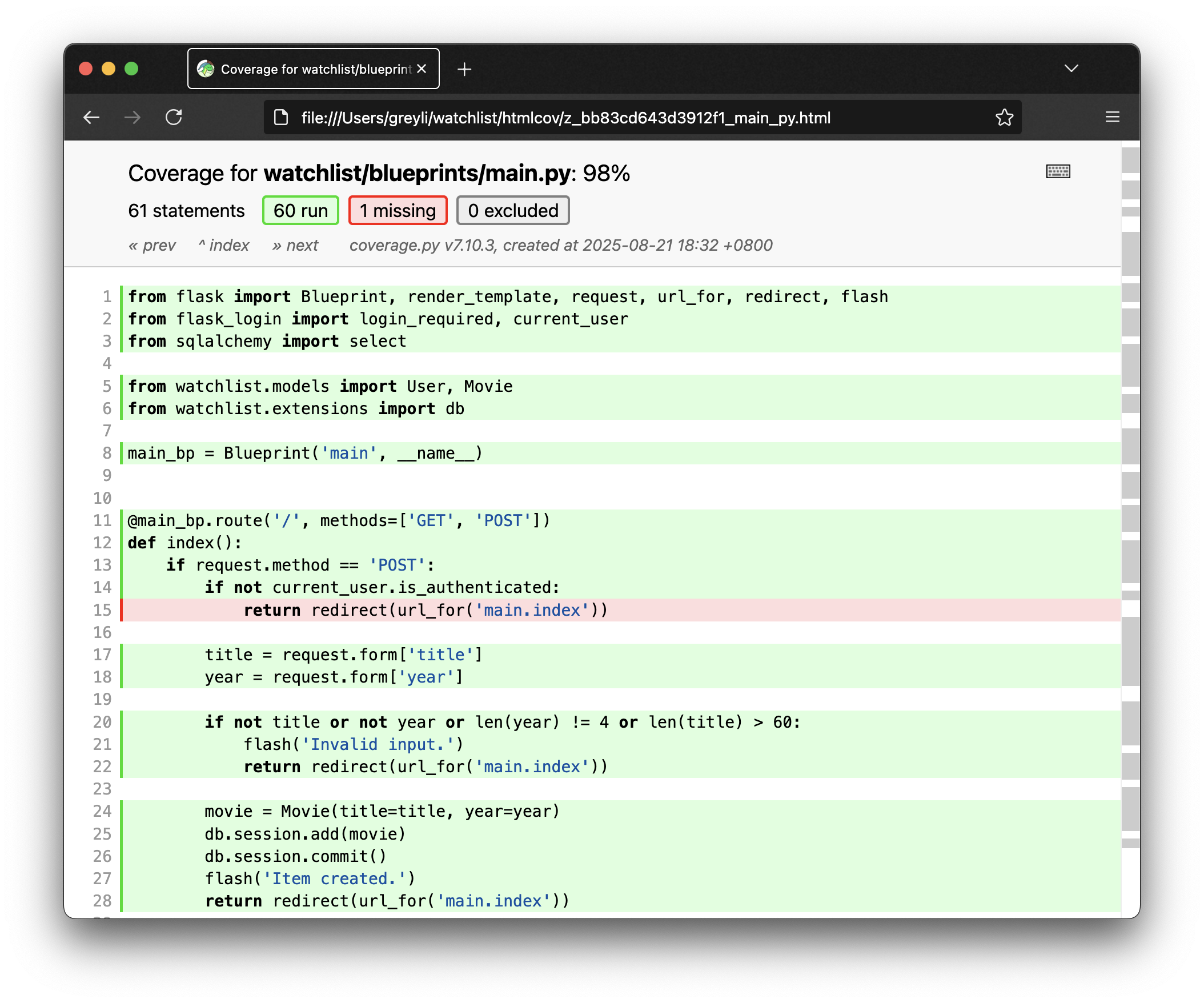
Add these lines to .gitignore so the generated coverage files are not committed:
htmlcov/
.coverage
Chapter summary
You can split tests into several modules in a tests package. Our suite is still small enough to keep in one file. Once the tests pass, we are ready to deploy. Before we finish, commit the code:
$ git add .
$ git commit -m "Add unit tests with unittest"
$ git push
Going further
- Visit the Coverage.py documentation or run
coverage helpfor more options. - unittest is not the only choice. You can also use a third-party framework such as the popular pytest.